
All-In-One Auto Mouse
A smart macro program that lets you orchestrate complex sequences of mouse clicks and keyboard inputs.
Features an advanced 3-phase (Setup-Loop-Teardown) execution structure.
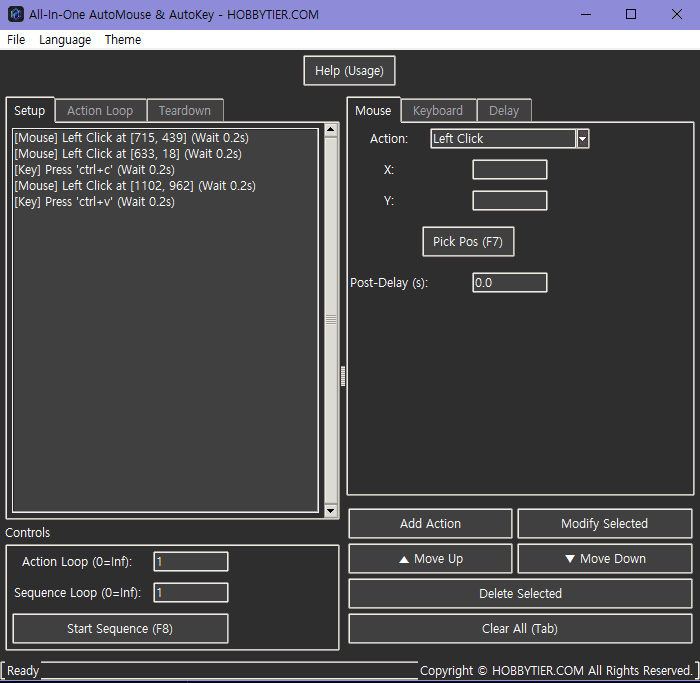
Core Principle: 3-Phase Execution
Beyond a simple auto-clicker, AutoKeyMouse allows fine-grained control by splitting the sequence into three independent execution stages.
1. Setup
Executes exactly once at startup. Ideal for preliminary tasks like aligning windows or logging in.
2. Loop
Repeats a specified number of times (or infinitely). Executes the core repetitive clicks and typing actions.
3. Teardown
Executes exactly once at the end. Best used for cleanup tasks such as closing browsers, logging out, or shutting down the PC.
Key Features & Usage
Adding Actions
- Mouse: Supports Left, Right, and Middle clicks. Press
F7to instantly extract current mouse coordinates. - Keyboard: Simply focus on the input field and press desired keystrokes (e.g.,
ctrl+c,enter) to intuitively record keyboard events. - Delay: Assign a Post-Delay to each action or insert independent Delay blocks to account for screen transitions or network lag.
Editing & Management
The recorded action list can be freely reordered using Move Up/Down, modified, or deleted. You can save your sequence as a `.json` file to load later. Additionally, the program automatically saves the current sequence upon exit to resume seamlessly on the next launch.
Safety Measures (Hotkeys)
At any point during the sequence execution, press the F8 key to immediately Stop all tasks. Using your mouse or keyboard while the program is actively simulating inputs may lead to unintended results, so please remember the emergency stop hotkey.
Ready to Automate?
Simply download the `.exe` file and run it. No installation is required. Running as administrator may yield better results in games or secure environments.
Download Auto Mousev1.0.0